1 UX designer, 2 PMs, 1 UX researcher, 1 technical writer, 1 tech team
Lead designer
Dec 2025 - Feb 2026
Figma
When customers contact Amazon with issues—defective products, missing deliveries, refund requests—Amazon customer service uses Case Management open cases to track and resolve these problems.
Each case contains a complex web of information: customer contacts, order details, seller communications, internal tasks, and resolution steps.
Currently, CSAs(customer service associates) navigate this information through a fragmented interface with multiple tabs (Tasks, Activity, Attachments), losing critical context like case status and next actions with each switch.
DESIGN PREVIEW
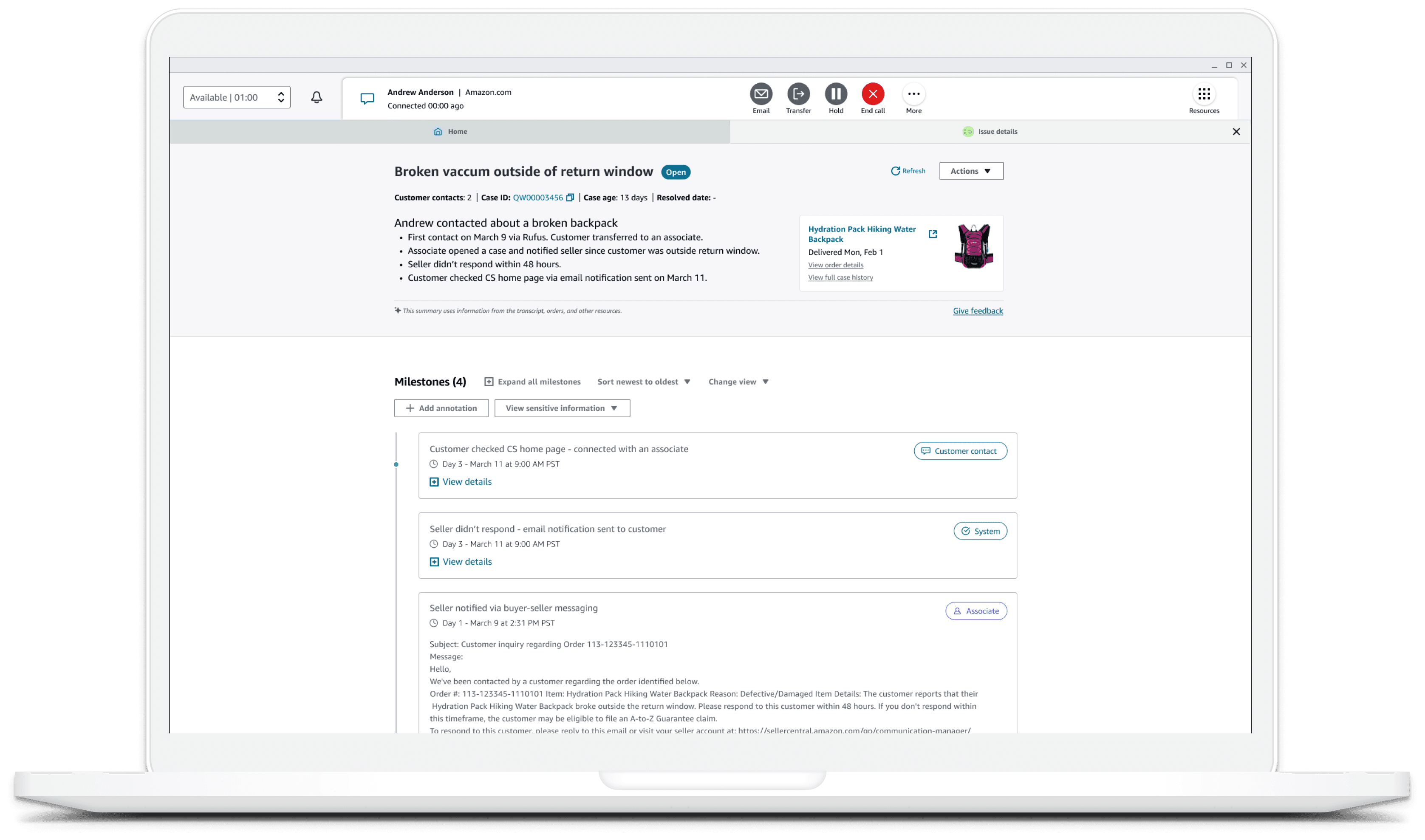
Image:final case page
Single-page layout with persistent header showing case status, customer contacts, case age. Presented a clear flow from Gen-AI case summary → milestones → next step creates obvious progression from "what happened" to "what to do".
Card-based milestone structure with day marker showing chronological progression
Next Step section surfacing "Open the dynamic workflow to resolve this case", providing clear next action.
DEFINING THE PROBLEM

Image:original case page
Fragmented information architecture
Users must click through multiple tabs (Tasks, Activity, Attachments) to understand the case. Critical context like case status and next actions disappears when switching tabs, forcing users to mentally stitch information together. CSAs lose 23% of mental context when switching between views.
Disconnected visual hierarchy
The interface doesn't show how pieces connect: which attachments support which tasks, which contacts relate to which activities, or how the timeline connects to pending actions.
Unclear next steps
Despite multiple pending items, there's no primary action or priority indicator.
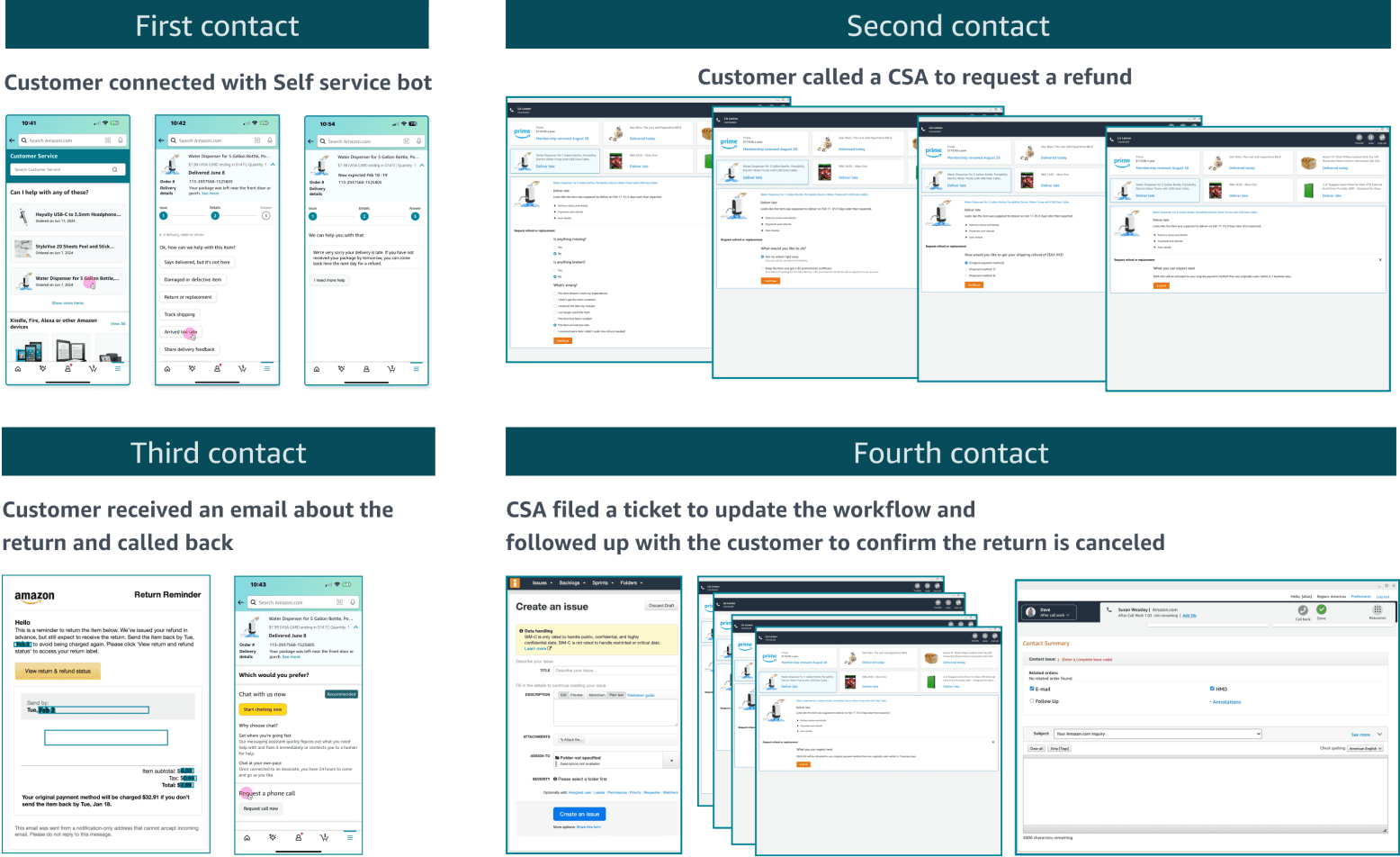
Image: Number of contacts from customer to get a resolution from customer service
Early implementation of case management in 2025 revealed significant challenges:
25.8% of cases are not resolved on first contact, customers average 2.84 contacts per case, and case resolution time averages 2.45 days.
For cases requiring follow-ups, resolution time extends to 6.3 days, with 48% of follow-ups rescheduled 3+ times and 55% missing their original deadline.
We need case management to track all interactions, but how can we present the information for CSAs and other stakeholders in a better way?
Design Question
EXPLORATION
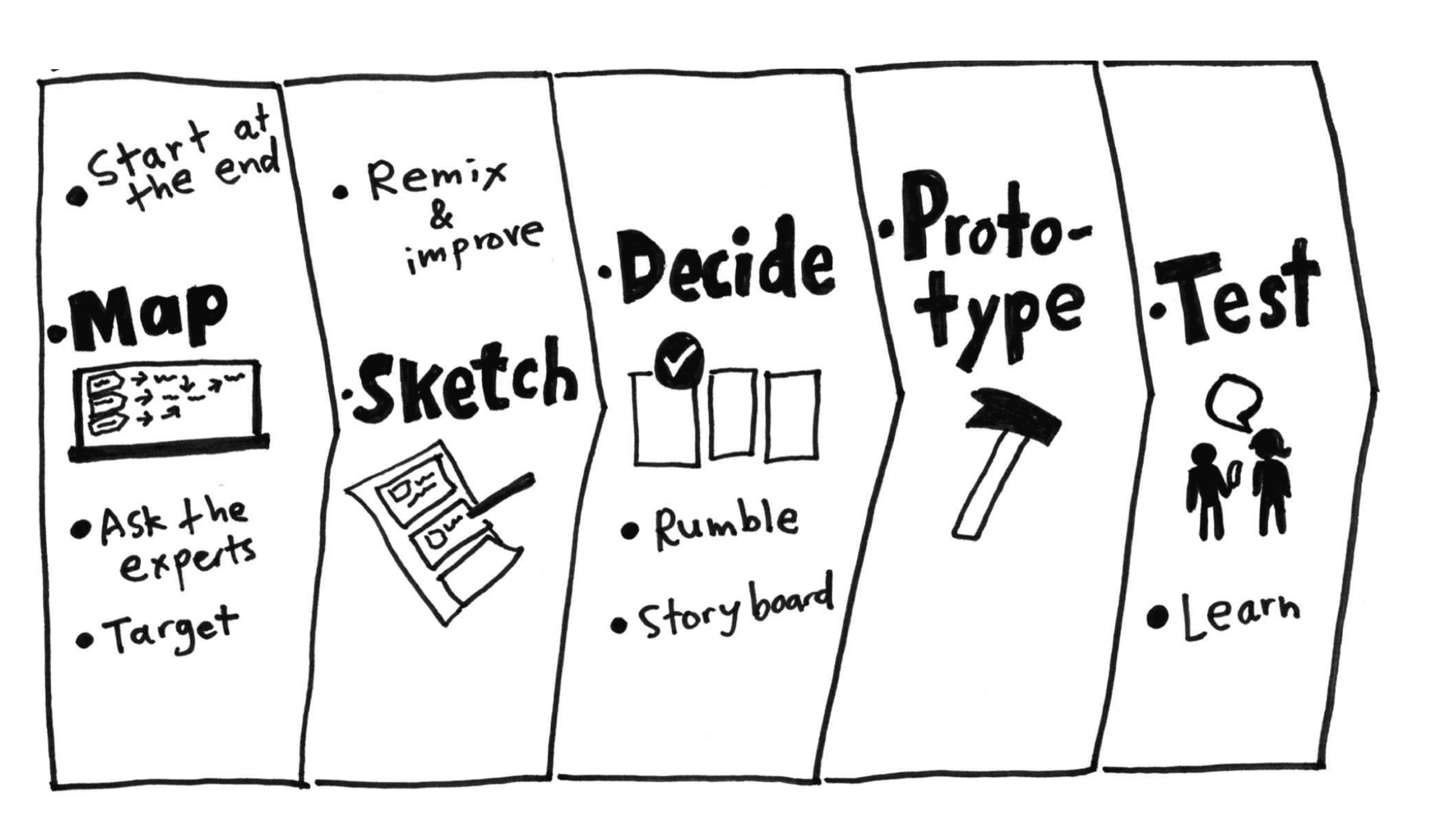
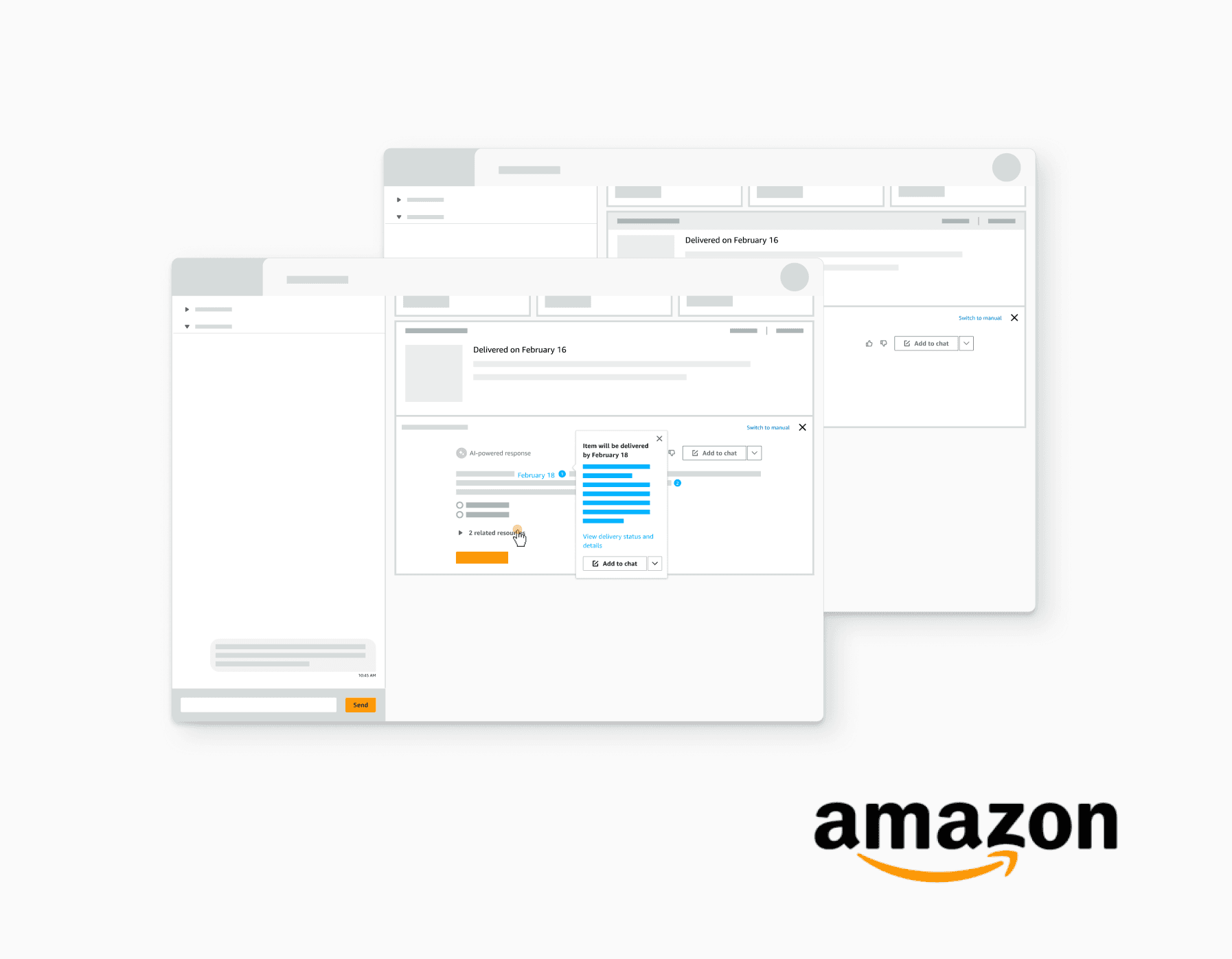
Image:design sprint from GV
In early 2026 we ran a design sprint to quickly test out some ideas and get initial feedback from CSAs.
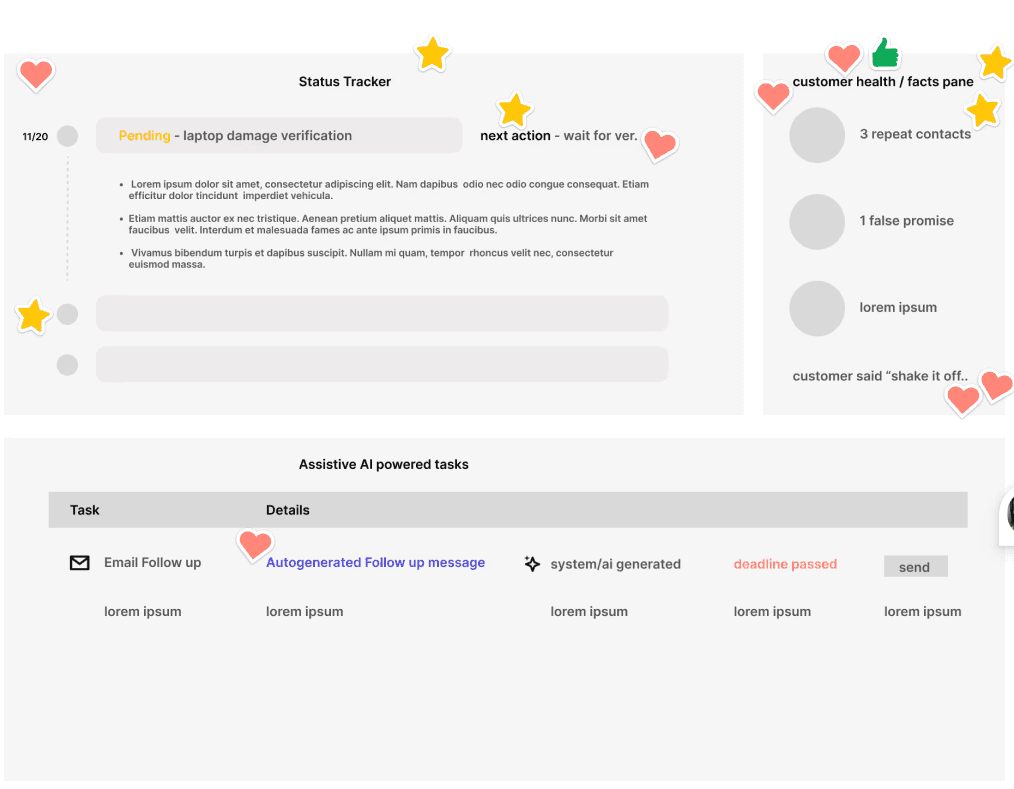
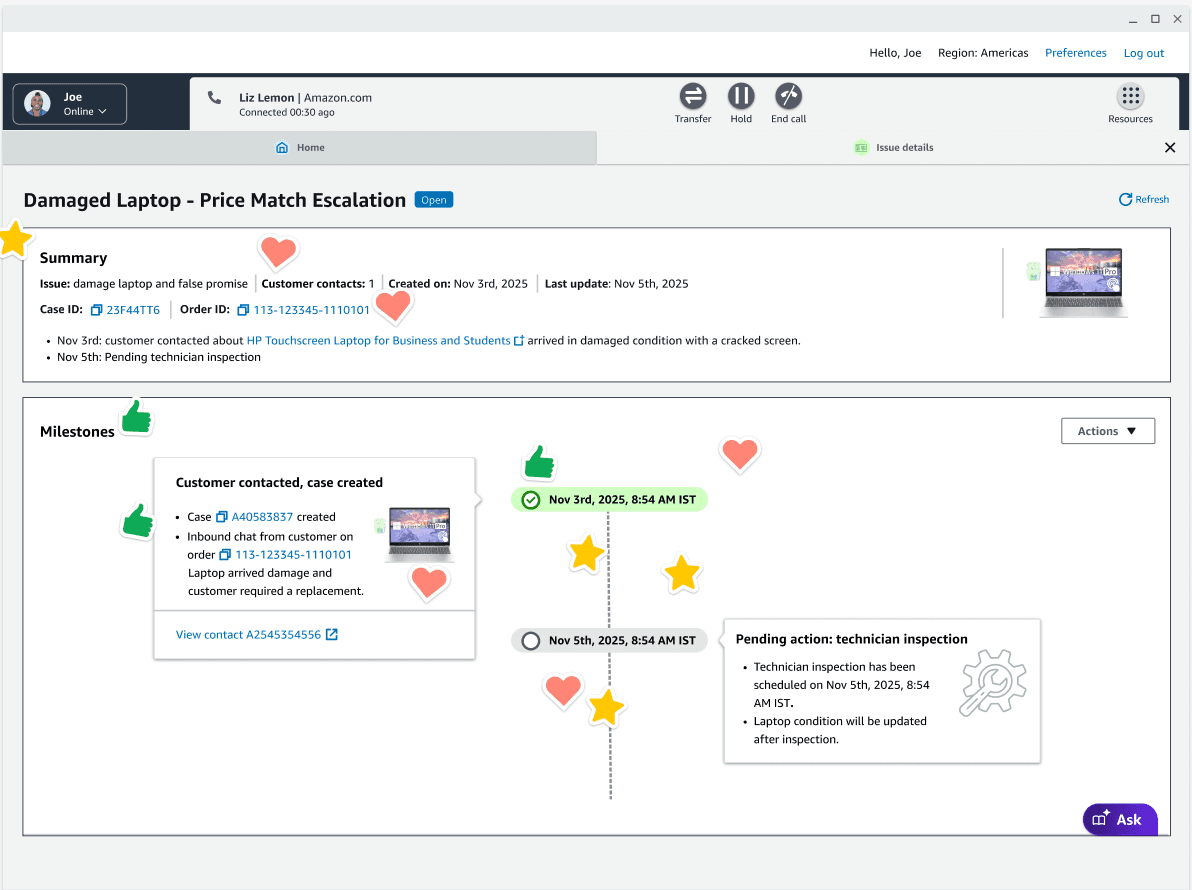
In the design exploration, stakeholders voted on the ideas they like:
ITERATION
Design change: Single-Page Layout (Eliminated Tabs)
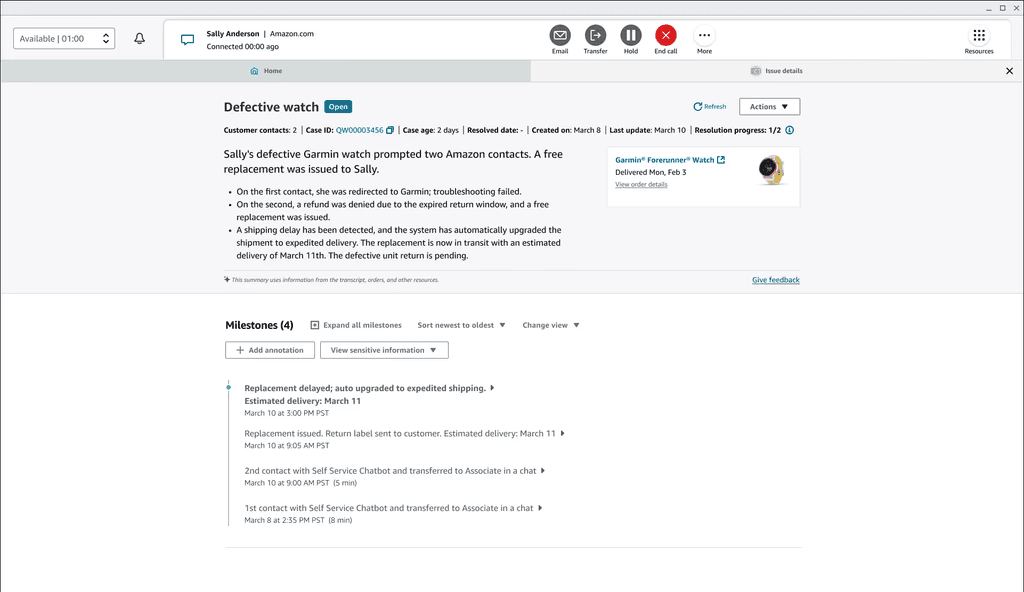
Description: Persistent header keeps case status, customer contacts, and case age visible at all times. Integrated timeline combines what were previously separate "tasks," "activities," and "contacts" into one unified Milestones view—no context loss when scrolling.
Rationale: Reduces cognitive load by eliminating context-switching costs. Research shows users lose 23% of their mental context when switching between views. A continuous scroll maintains spatial memory—users remember "where" information lives on the page rather than "which tab" it's in.
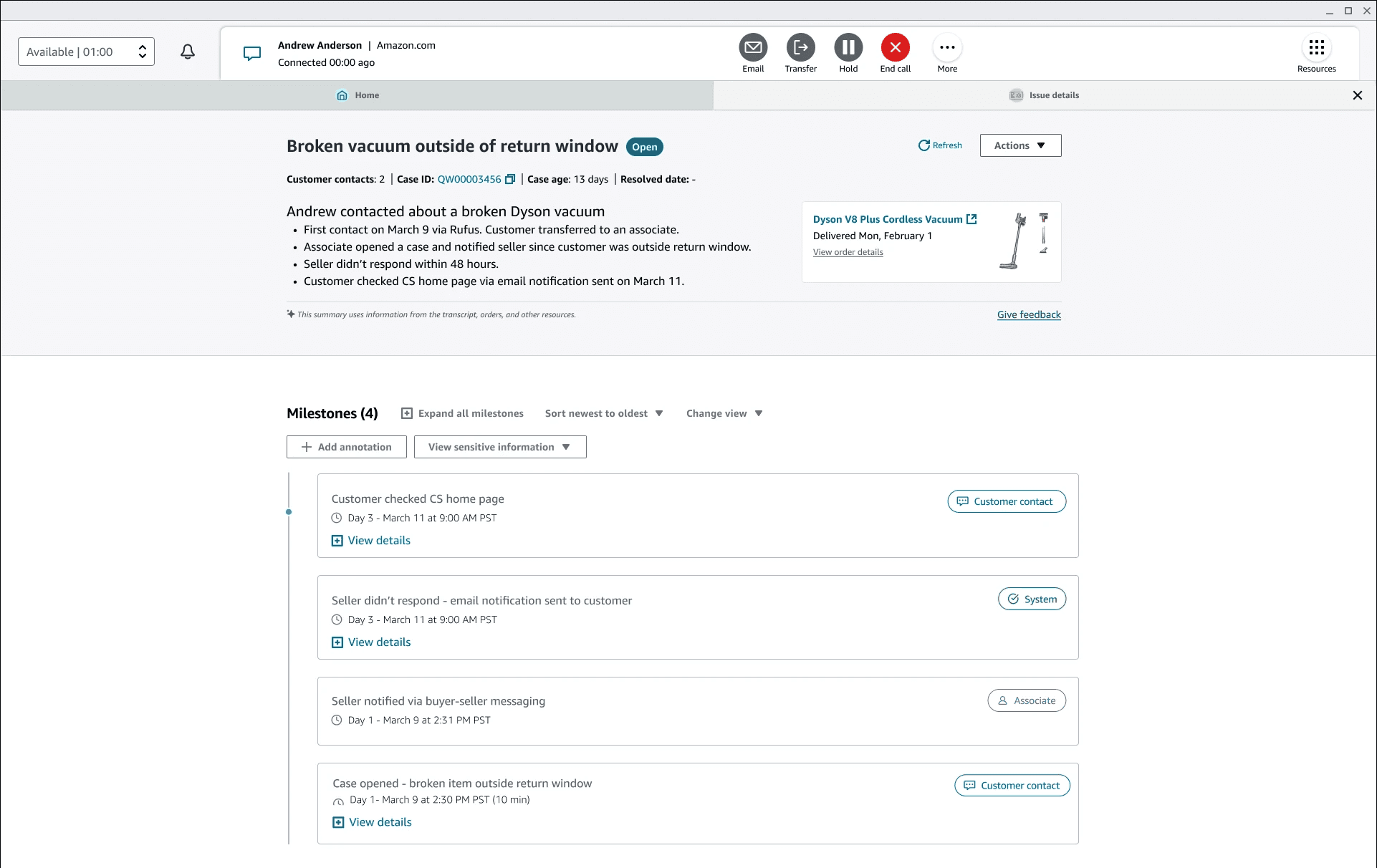
Design change: In the milestone view, plain texts have been updated to card-based layout.
Description
Chronological Cards with Day Markers with clear boundaries and white space replaces dense text list. Stable card layout prevents jumping content when expanding
Rationale
Transforms absolute timestamps into relative time (Day 1, Day 3), which is easier for humans to process. Shows temporal relationships at a glance—users can see "this happened 3 days after that" without mental math. Card format creates clear visual boundaries between events.
Description
Color-Coded Actor Badges: (blue "Customer contact", purple "Assocaite") instantly show who initiated each action
Rationale
Leverages pre-attentive processing—the brain recognizes color patterns before reading text. Green (System), blue (Customer contact), purple (Associate) create instant visual categorization, reducing time to identify who took action from ~3 seconds to <1 second.
Description
Simplified Card Structure:Card-based layout with clear boundaries and white space replaces dense text list
Rationale
Follows Miller's Law (7±2 items in working memory). Dense tables with 6-8 columns exceed cognitive capacity, forcing users to re-scan repeatedly. Cards show only essential information (what, when, who), with "View details" for deeper inspection—progressive disclosure reduces initial cognitive load.
Design change: Added clear next step to the page. A clear flow from Gen-AI case summary → milestones → next step creates obvious progression from "what happened" to "what to do".
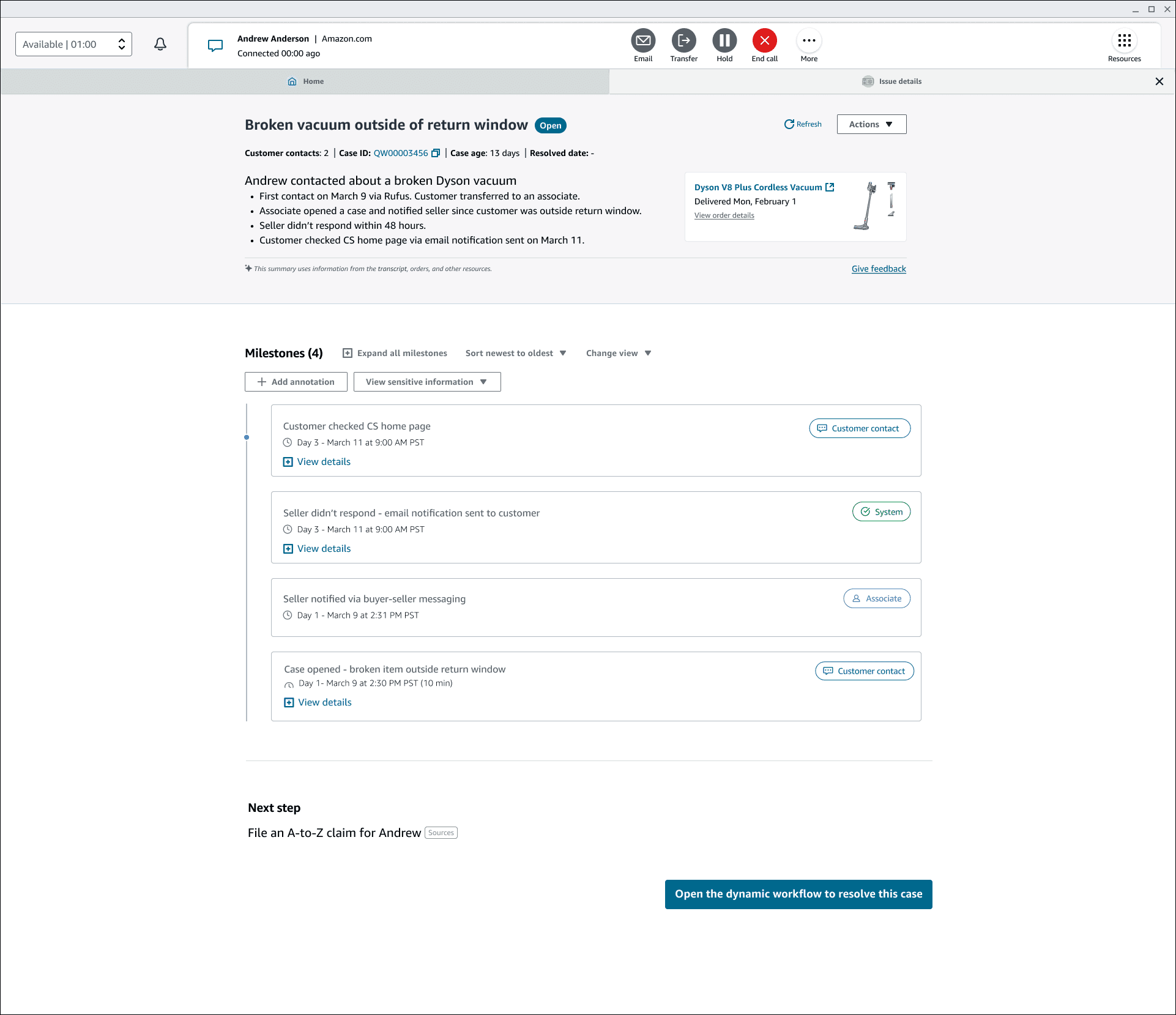
Description:
Context-specific action button that launches guided workflow for case resolution, surfacing the most critical next action without requiring CSAs to search for next steps.
Rationale:
liminates decision fatigue by providing clear primary action. Transforms interface from passive information display to active workflow tool, reducing time-to-action and cognitive load.
FINAL DESIGN
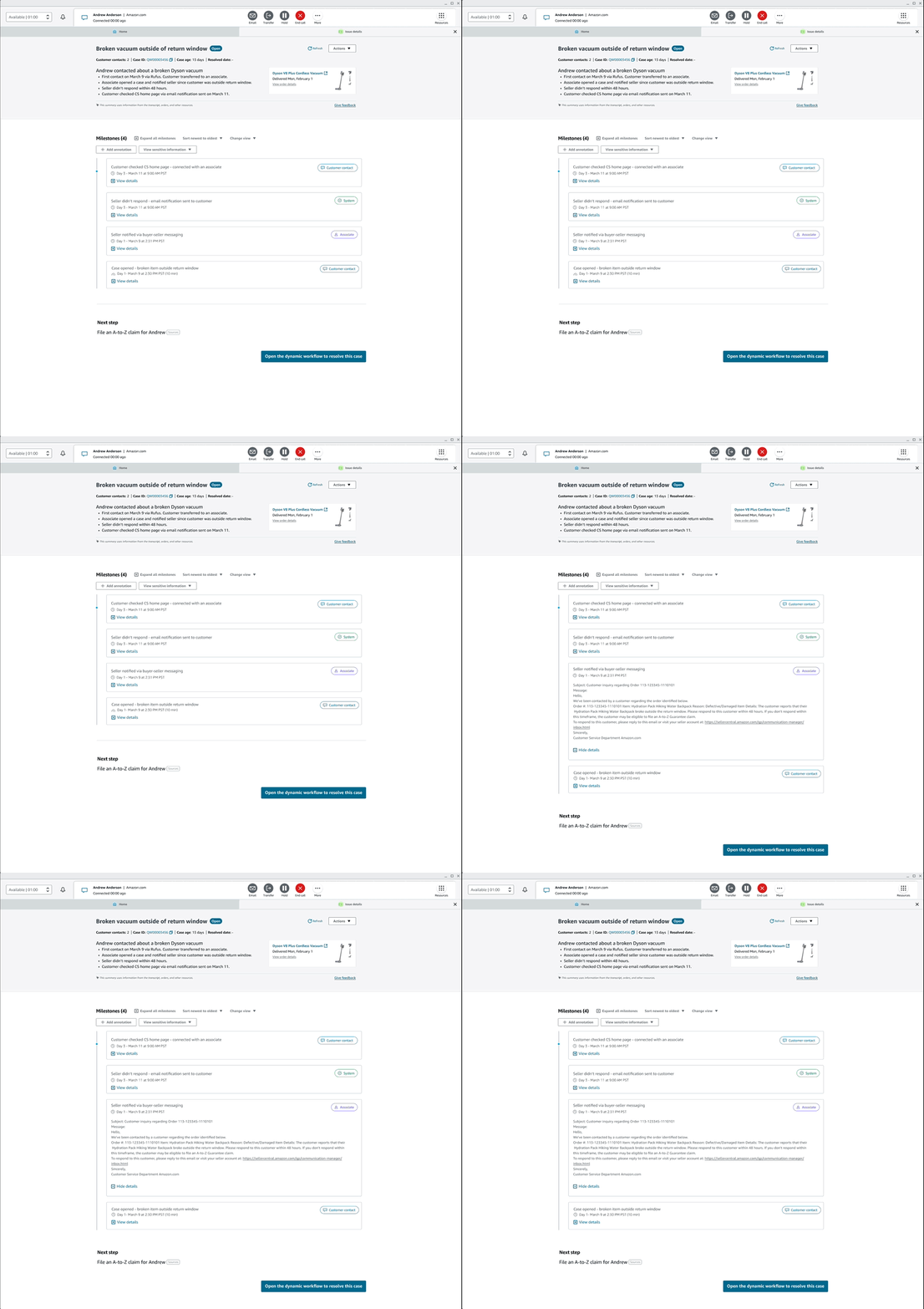
CSAs click individual milestone cards to reveal complete verification details inline—full message content, timestamps, order IDs, and actionable links—without leaving the timeline. This maintains spatial context while providing granular information for customer verification during live contacts.
MAJOR CONSIDERATIONS
Challenge: When cases have multiple contacts about the same issue and generate 10+ milestones, associates face cognitive overload trying to understand the narrative.
How do we design the LLM-driven milestone structure?
Feed the LLM this semantic clustering logic:
For open cases, there are 3 phases:
1. Initial Contact (No Investigation): No grouping—show all 2-4 milestones chronologically.
2. Active Investigation: Two phases—Initial Contact (collapsed) + Investigation (expanded, showing separate milestones with visual arrows).
3. Pending Actions: Three phases—Initial Contact (collapsed) + Investigation (collapsed) + Pending Action (expanded, showing recent events).
For resolved cases:
Initial contact, investigation and resolution 3 milestones..
Issue-status Clustering (Macro-Level)
When designing the LLM, we make sure that LLM detects which status actually exist in the case data and groups accordingly based off the structure above.
Causal Chain Visibility (Micro-Level)
Shows relationships between individual milestones within a phase using visual connectors (arrows, indentation).
TAKEAWAYS AND NEXT STEPS
Communication with the Team: This redesign required close collaboration across multiple teams—CS-Tigers for case management, OneCM for summarization, CS-Beavers for workflows, and ACP for seller communications. Regular sync-ups and shared design artifacts ensured alignment on the unified timeline vision and LLM integration strategy. Transparent communication about technical constraints helped set realistic expectations.
Design: The shift from multi-tab fragmentation to single-page narrative architecture fundamentally changed how CSAs interact with cases. Key design principles—progressive disclosure, color-coded actor badges, and semantic milestone grouping—reduced cognitive load while maintaining access to granular details. The "Next Step" section proved transformative, bridging the gap between information display and action-oriented workflow.
Adapting to Meridian Design System: Integrating with Amazon's Meridian design system ensured consistency with broader CS tools while allowing innovation in milestone visualization. Card-based components, color tokens, and interaction patterns from Meridian accelerated implementation and improved accessibility compliance.
Validate designs with more use cases: Test the milestone grouping logic across diverse scenarios—multi-order cases, escalations, refund disputes, third-party seller issues—to ensure the semantic clustering and progressive disclosure patterns hold up under real-world complexity.
Design escalation path for repeat contacts: When customers contact 3+ times about the same unresolved issue within a week, especially for high-value items, the system should automatically flag for escalation. Collaborate with operations teams and associate managers to define escalation criteria, notification mechanisms, and specialized workflow routing.
Expand data sources for case summaries: Integrate additional context beyond contacts and BSM—order history, product reviews, warranty information, return policies—to provide CSAs with complete customer context. Prioritize data sources based on impact to resolution speed and customer satisfaction.
The journey continues—this first iteration establishes the foundation for a truly intelligent, context-aware case management system.
Haimeng Gan © 2026